
Gemini 4 Argon API vs. Renting GPUs: When Pay-Per-Token Stops Making Sense
Google’s Gemini 4 Argon opened to paying developers on 13 October at an introductory $2 per million input tokens and $10 per million output tokens. It looks strong and it looks cheap, which is exactly when an API bill starts to creep. For a team that already pays for LLM tokens, the useful question is not whether Argon is good. It is whether pay-per-token is still the right way to buy inference at your volume, or whether a rented GPU would cost less. This guide uses Argon’s launch as the example, shows how to compute your own break-even point, and is honest about the cases where the right answer is to stay on the API.
Status box: facts as of 15 October 2026. Argon is available in the paid Gemini API as
gemini-4-argonand in the Gemini app for Google AI Pro and Ultra subscribers. Introductory API pricing runs through 30 November 2026, with standard rates after that. Prices and access change quickly, so check Google’s pricing page before you budget.
What Gemini 4 Argon changes for teams that buy compute
Google announced Argon on 30 September 2026. It first went to a small group of cyber defenders, then widened on 13 October to the Gemini app (Pro and Ultra plans) and the paid Gemini API, including Google AI Studio.
Three facts matter for an infrastructure decision:
- It is a closed, proprietary model. You use it through Google’s API and apps. Google has not published weights, so it cannot be self-hosted, and it cannot be rented from GPU-host.com or any other GPU provider as a workload.
- It is priced per token. Your cost scales with usage, with no fixed monthly floor.
- Its context limit is described differently by different sources. Launch coverage describes a single 1 million-token budget shared across input and output, while Google’s earlier messaging called it a 1 million-token output cap. Confirm the exact limits in Google’s model documentation before you design around them.
What this does not mean: that you must choose Argon, or that you must leave an API to use a GPU. It is a new, credible price point to measure your options against.
What Argon really costs (and why the list price misleads)
Intro versus standard rates
Per million tokens, as reported at launch:
| Model | Input | Output | Notes |
|---|---|---|---|
| Gemini 4 Argon (intro, to 30 Nov) | $2 | $10 | Cached input about 95% cheaper ($0.10) |
| Gemini 4 Argon (standard, from 1 Dec) | $4 | $20 | Cached input about $0.20 |
| Claude Opus 5.5 | $4 | $20 | Same list price as Argon’s standard rate |
| GPT-6.1 Sol | $2 | $10 | A separate OpenAI model |
| GPT-6 Astra | $10 | $50 | A separate, higher-tier OpenAI model |
GPT-6 Astra and GPT-6.1 Sol are different products with different prices, so check which one a comparison is using. All rates are as reported by launch coverage; verify them on each vendor’s pricing page before you cite or budget with them.
Cost per task is not cost per token
Per-token price only tells you the rate. What you pay depends on how many tokens the model uses to finish a job. Artificial Analysis, an independent benchmarking firm, publishes the average cost of one task in its Intelligence Index:
| Model | Cost per index task |
|---|---|
| Gemini 4 Argon (high effort, intro price) | $1.99 |
| GPT-6 Astra | $3.26 |
| Claude Opus 5.5 | $5.98 |
Two details change how you should read that table:
- Argon is verbose. Artificial Analysis reports it generated about 110 million tokens across the full index, against a median of 82 million, and roughly 62,000 output tokens per task versus about 27,000 for GPT-6 Astra.
- The intro price is temporary. Our arithmetic, not a published benchmark: if token use stays the same, standard rates double the per-task cost to about $3.98. At that level Argon is still roughly a third cheaper per task than Opus 5.5, but about 20% more expensive than GPT-6 Astra on this index.
So the headline “Argon costs a fifth of the top rival” is true per token only during the intro period. Per finished task, the gap is much smaller, and after 30 November it narrows or reverses against some rivals.
Open billing questions
- Thinking tokens. Launch coverage says Argon’s output price includes thinking tokens, but at least one early analysis said Google had not clarified how reasoning tokens are billed. This changes the cost model, so confirm it on Google’s pricing page.
- Effort level. Benchmarks were run at the highest thinking setting, while the API default is reportedly lower. Your bill and your quality will both differ from the published figures depending on the setting you choose.
- Your mix is not the benchmark’s mix. Cost per task is an average across Artificial Analysis’s tests. Measure your own prompts before you trust any average.
What the benchmarks do and don’t tell an infrastructure buyer
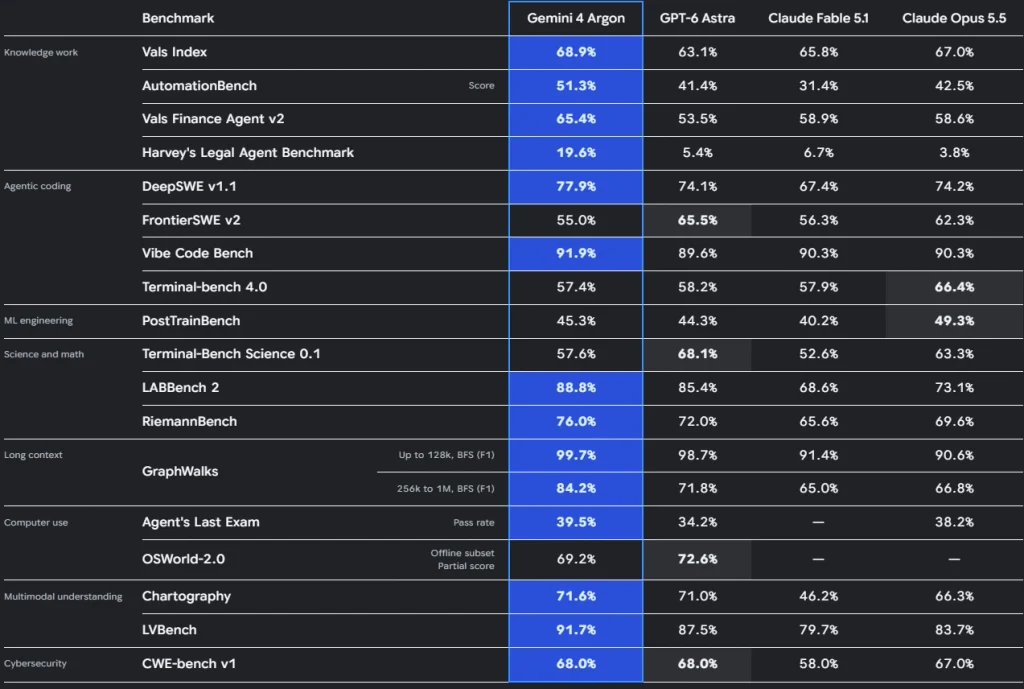
You do not need a full model review to make a buying decision, but you do need to know how much to trust the numbers. Keep vendor-reported and independent results separate.
| Vendor-reported (Google) | Independent (Artificial Analysis) | |
|---|---|---|
| Overall | Leads on agentic coding and knowledge-work benchmarks | Intelligence Index 52.6 for Argon, level with GPT-6 Astra (about 52.7), versus 57.6 for Claude Opus 5.5 |
| Where Argon is ahead | Agentic coding and knowledge work, per Google’s launch table | AutomationBench-AA: 77.5% versus 69.5% for Opus 5.5; a low hallucination rate on AA-Omniscience |
| Where it is behind | Not highlighted | SciCode: 61.8% versus 66.9% for Opus 5.5; also behind on Terminal-Bench and 3D output in several reviews |
The pattern is a strong but uneven model: competitive with the other frontier models, clearly ahead on some agentic and knowledge tasks, and behind the best on others.
How to read a benchmark table. A vendor chart shows the model at its best setting on tasks the vendor chose. At launch, no third party had fully reproduced Google’s table. Treat a benchmark as a way to shortlist models, not as a prediction of how a model handles your prompts, your documents and your error tolerance. Run a few hundred of your own real requests before you commit.
API vs. dedicated GPU: the real trade-offs
The comparison below is between a frontier API such as Argon and an open-weights model you run on a rented GPU server. Neither wins everywhere.
| Factor | Frontier API (e.g. Argon) | Rented GPU, self-hosted model |
|---|---|---|
| Cost shape | Variable: you pay per token, so cost scales with usage | Mostly fixed per month, so unit cost falls as utilisation rises |
| Capability ceiling | Highest available; no model to train or tune | Limited to the open models you can run; may be below frontier quality |
| Data control and residency | Data goes to the provider; depends on its terms and your plan | Data stays on a server you control |
| Latency predictability | Shared infrastructure; can vary with load | Predictable when the server is not oversubscribed |
| Rate limits and quotas | Set by the provider and your tier | Limited only by your hardware |
| Model lock-in | Price, versions and availability are the provider’s to change | You choose, pin and swap models yourself |
| Operations burden | Close to none | You run serving, monitoring, updates and security |
| Time to first result | Minutes: get a key and call the API | Hours to days: provision, deploy, test |
Be candid about the outcome: for frontier capability and for low or spiky volume, the API usually wins. A GPU only pays off when volume is high and steady, when data control matters, or when a smaller or fine-tuned model is good enough for the task. For data handling, read Google’s data-use and retention terms for the plan you would actually use, since they differ between plans.
How to find your break-even point
The four inputs
- Monthly input tokens (the prompts, documents and context you send).
- Monthly output tokens (what the model writes back, including thinking tokens if they are billed).
- Price per million tokens for input and output.
- The monthly cost of the GPU server that could serve the same workload.
Two adjustments sit on top of those: utilisation (what share of the month the server is doing useful work) and the quality gap between a frontier API and the smaller model you could self-host.
A worked example
Take an illustrative workload of 500 million input tokens and 100 million output tokens a month.
| Rate | Input cost | Output cost | Monthly API bill |
|---|---|---|---|
| Intro ($2 / $10) | $1,000 | $1,000 | $2,000 |
| Standard ($4 / $20) | $2,000 | $2,000 | $4,000 |
Notice that output is only about 17% of the tokens but half of the bill. If half your input tokens hit the cache at standard rates (about $0.20 per million), the bill falls to roughly $3,050. Caching helps, but only if your prompts repeat.
The workload is 600 million tokens at a 5:1 input-to-output mix, so the blended price is about $3.33 per million tokens at intro rates and $6.67 per million at standard rates. The break-even volume is then:
Break-even tokens per month = monthly GPU server cost ÷ blended API price per million tokens
For a few example server budgets, at the same 5:1 mix:
| If your GPU server costs per month | Break-even at intro rates | Break-even at standard rates |
|---|---|---|
| $500 | about 150 million tokens | about 75 million tokens |
| $1,000 | about 300 million tokens | about 150 million tokens |
| $2,000 | about 600 million tokens | about 300 million tokens |
| $4,000 | about 1.2 billion tokens | about 600 million tokens |
These budgets are examples. For a real figure, take the current monthly price of the server you would use from our GPU VPS plans and plug it into the formula.
The table only compares token prices. It does not prove a self-hosted model can do the job. Above break-even, a GPU is cheaper only if the model you can run on it is good enough for your task and the server can actually sustain that volume at your latency target. If it cannot, the cheaper bill is not a saving.
What breaks the math
- Low utilisation. A server that sits idle at night and on weekends costs the same as a busy one.
- Engineering time. Setup, tuning, monitoring and on-call work are real costs that rarely appear in the spreadsheet.
- Quality loss. If the self-hosted model needs more retries or human review, the savings shrink.
- Price changes on either side. Argon’s intro price ends on 30 November, and GPU prices and open models move too. Re-run the numbers every quarter.
Which workloads belong where
| Workload | Volume | Data sensitivity | Better fit |
|---|---|---|---|
| Hard reasoning, research, complex coding | Any, often low | Moderate | Frontier API |
| Long-horizon agents that must be reliable | Low to medium, spiky | Moderate | Frontier API |
| Prototypes and early-stage products | Low and unknown | Low | Frontier API |
| Classification, extraction, tagging, routing | High and steady | Low | Rented GPU, smaller model |
| Bulk summarisation or document processing | High and steady | Any | Rented GPU, or a cheaper API tier |
| Regulated or confidential data | Any | High | Rented GPU, or a contractually suitable API plan |
| Fine-tuned or specialised domain model | Medium to high | Any | Rented GPU |
A useful rule of thumb: pay per token for the work that needs the best model, and rent compute for the work you can describe precisely and run constantly.
Checklist: before you move inference to a rented GPU
This checklist is deliberately conservative. Confirm model-specific figures with an engineer before you rely on them.
- Define the job. Write down the task, the quality bar and the acceptable error rate, and test your candidate model against real examples from your own data.
- Size the GPU memory. The model weights, the context you need and the number of concurrent requests all consume memory. Check the model card and run a load test instead of guessing; see our GPU VPS basics and hardware comparisons.
- Choose a serving stack. Pick an inference server that supports batching and streaming for your model, and pin versions so upgrades do not surprise you.
- Plan monitoring and fallback. Track latency, error rate, queue depth, GPU utilisation and cost per request, and keep an API route ready for when the server is down or overloaded.
- Harden security. Restrict network access, keep the OS and drivers patched, protect API keys, and keep logs free of sensitive prompts.
- Set cost alerts. Alert on both the GPU bill and any fallback API spend, so one cannot quietly grow past the other.
- Write a rollback plan. Know how you would switch traffic back to the API within minutes.
For step-by-step setup, see our deployment guides.
The hybrid pattern
Many teams end up with both. The idea is simple: route hard requests to a frontier API and bulk requests to your own server.
In practice that means one internal interface, such as a small gateway, that every product feature calls. The gateway sends a request to the self-hosted model by default and escalates to the API when the request is flagged as hard, when confidence is low, or when the local server is unavailable. You keep a single code path, you cap the spend on the expensive model, and you can move traffic between the two as prices and models change.
Start by sending only a small, well-understood slice of traffic to the GPU, compare results against the API, and widen the slice as you gain confidence.
Glossary and next step
- Input tokens: the text you send to the model, counted in small chunks called tokens.
- Output tokens: the text the model generates, usually priced higher than input.
- Cached input: repeated prompt content the provider has stored and bills at a steep discount.
- Thinking (reasoning) tokens: intermediate tokens a model generates while it works through a problem, which may or may not be billed as output.
- Context window: the maximum amount of text a model can handle in one request.
- Inference: running a trained model to produce answers, as opposed to training it.
- Utilisation: the share of time a server spends doing useful work.
- Self-hosting: running a model on hardware you control instead of calling a provider’s API.
Next step: take your monthly token counts, run them through the formula above, and then estimate the GPU server your workload needs. If the numbers say stay on the API, that is a valid result. For more on running your own AI workloads, visit our AI infrastructure hub.
Sources
- Google announcement and launch coverage of Gemini 4 Argon access and pricing, 13 October 2026 (Google blog and The New Stack: https://thenewstack.io/?p=22840213)
- Artificial Analysis model comparisons, including Argon versus Claude Opus 5.5: https://artificialanalysis.ai/models/comparisons/gemini-4-argon-vs-claude-opus-5-5
- Artificial Analysis model comparison, Argon versus GPT-6 Astra: https://artificialanalysis.ai/models/comparisons/gemini-4-argon-vs-gpt-6-astra-xhigh
- Hands-on API test on launch day (Computing for Geeks): https://computingforgeeks.com/gemini-4-argon-released-features-benchmarks/